Lot of people I know keep having issues when installing toolbars (they never seem to check what they are installing) and kick up a fuss because there default search using the URL changes to AVG Secure or some other crazy toolbar. I’m sure there are hundreds that cause issue.
This short page will help you to get rid of the horrible search providers and stick with Google.
Start Mozilla Firefox, and type about:config into the url. This will bring up the following page.

If you have any warranty that may be void – please DO NOT proceed, and I am afraid you will have to go to and get this repair carried out by the warranty company.
If you are happy to proceed, the click “I’ll be careful, I Promise!”.
Once you have entered the next screen, type the following into the search bar;
keyword.url
Now, you will see the next screen;
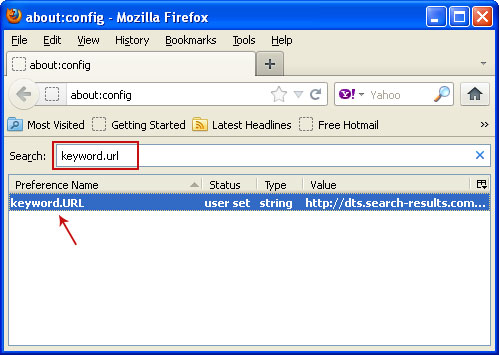
Here is shows the value as http://dts.search-results.com etc , if you right click this and choose modify – and enter the following value to reset the URL search information.
http://www.google.com/search?ie=UTF-8&oe=utf-8&q=
You will have to reset Firefox for these changes to take effect.
Comments are closed